BenQ PD2730S 27" 5K Designer Monitor
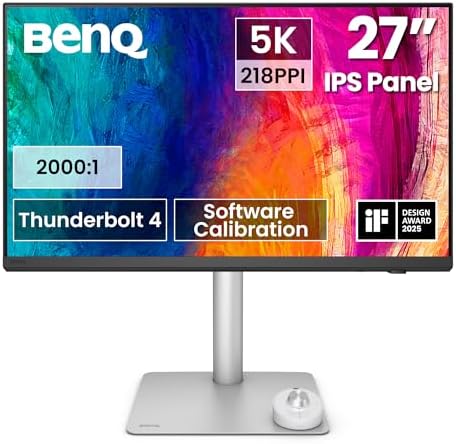
A true 5K Mac-tuned designer monitor with 90W Thunderbolt 4 and a height-adjustable stand for $300 less than Apple's Studio Display.
Price may vary. As an affiliate, we earn from qualifying purchases.
What we like
- True 5K (5120x2880) at 218 PPI matches Studio Display sharpness on macOS
- 90W Thunderbolt 4 with daisy chain — one cable to a MacBook Pro and a second 5K downstream
- Nano matte panel kills glare without the fuzzy sparkle of older anti-glare coatings
- Height-adjustable, tilt, swivel, pivot stand included (Apple charges $400 extra)
- Built-in KVM lets you run a Mac and a PC from one keyboard and mouse
Could be better
- Pricey — $1,299 is real money, even if it undercuts the Studio Display
- 60Hz refresh rate, so it's not for gaming or high-frame-rate motion work
- Speakers are present but underwhelming compared to the Studio Display's six-driver array
Full Review
The BenQ PD2730S is the monitor a lot of Mac users have been waiting for: a true 5K, 218 PPI panel that matches the Apple Studio Display’s pixel density without the Apple tax. At $1,299, it’s roughly $300 cheaper than the Studio Display — and that’s before you factor in that BenQ includes a fully ergonomic stand instead of charging $400 extra for height adjustment.
Why 5K Matters on a Mac
macOS scales beautifully at exactly 218 PPI because that’s the density Apple designed Retina around. Plug a MacBook Pro into a standard 4K 27” panel and text gets either too small or fuzzy at non-integer scaling. The PD2730S sidesteps that entirely. Default scaling looks like a giant Retina display — sharp text, crisp UI elements, no shimmer on thin lines. For anyone doing UI design, photography, or long-form writing, the difference versus 4K is immediate.
Color, Coating, and Calibration
BenQ ships the panel factory-calibrated with 98% DCI-P3 coverage and Delta E < 1.5 accuracy. The 2000:1 contrast ratio is noticeably better than the typical 1000:1 IPS panel — blacks have actual depth instead of looking dark gray. The nano matte coating is the unsung hero here: it eliminates reflections in a bright office without the grainy sparkle that older anti-glare coatings introduce. If you’ve seen the SW272U’s panel, it’s the same family.
One-Cable Workflow
Thunderbolt 4 carries video, 90W of charging, and a powered USB hub up to a MacBook Pro over a single cable. You can daisy chain a second PD2730S off the back, which is genuinely useful for video and 3D work. The built-in KVM is the bonus feature most reviews undersell — flip a hotkey and your keyboard and mouse jump from a Mac to a PC tower without fumbling for cables.
Studio Display Comparison
The Studio Display still wins on speakers, the integrated webcam, and that all-aluminum aesthetic that matches a Mac Studio. The PD2730S wins on the stand (included vs. $400), the matte coating, the KVM, and HDMI/DisplayPort inputs that Apple omits. If you want a monitor that’s only a Mac monitor and you love the Apple look, get the Studio Display. If you want a tool that does the same job for less and works with everything else on your desk, the PD2730S is the smarter buy.
Who Should Buy This
Buy the PD2730S if you’re a designer, photographer, or developer on macOS who wants Studio Display sharpness without paying Apple’s stand tax — or if you bounce between a Mac and a PC and want a single monitor with a real KVM. Skip it if you need a high-refresh display for gaming or motion work, or if the Studio Display’s speakers and webcam are non-negotiable for your setup.


