Corsair Vanguard Pro 96 Hall Effect Keyboard
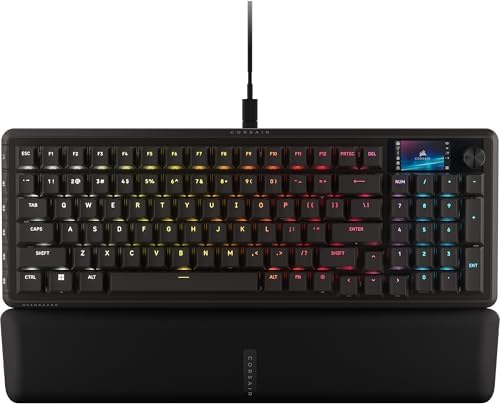
Corsair's first mainstream Hall Effect board pairs MGX Hyperdrive switches with a 1.9" LCD that's genuinely useful for work, not just gaming flair.
Price may vary. As an affiliate, we earn from qualifying purchases.
What we like
- MGX Hyperdrive HE switches with adjustable actuation and rapid trigger
- 1.9" 320x170 IPS LCD is bright and high-res enough for real information
- Stream Deck integration turns the display and rotary dial into productivity tools
- 96% layout keeps the numpad without TKL-plus footprint bloat
- 8000Hz polling and 150M-press switch rating
Could be better
- Wired only — no Bluetooth or 2.4GHz option at this price
- Corsair Web Hub configuration is less polished than Wooting's Wootility
- ABS keycaps at $230 feel cheap next to PBT competitors
- Display burns battery on laptops and adds desk glow at night
Full Review
The Vanguard Pro 96 is Corsair’s answer to Wooting and ASUS in the Hall Effect race, and the angle they picked is the LCD. Every other premium HE board treats the display as a gimmick or skips it entirely. Corsair built a 1.9” IPS panel into the top-right corner that’s actually large enough to read from across a desk, and that single decision changes who this keyboard is for.
The Display Is the Real Story
A 320x170 IPS screen sounds small until you see it next to the postage-stamp OLEDs on most “smart” keyboards. It’s bright, sharp, and Corsair’s Web Hub lets you push custom text, animated GIFs, calendar widgets, Pomodoro timers, CPU stats, and Stream Deck-style action buttons. I ran a focus timer on the left half and a now-playing widget on the right for a week and never opened the Stream Deck app on my second monitor.
Combined with the rotary dial, the display becomes a genuinely useful productivity surface. Twist to scrub timeline in Premiere, push to mute Zoom, twist again to adjust mic gain — all without touching the mouse. This is the first HE keyboard where the extras justify the price for someone who doesn’t play competitive shooters.
Switches and Typing Feel
MGX Hyperdrive switches are smooth, pre-lubed, and adjustable from 0.1mm to 4.0mm. Dual actuation lets you bind a soft press to one action and a full press to another, which is gimmicky for typing but excellent for shortcuts — soft tap for mute, hard press for hangup. Rapid trigger works as advertised for gaming.
The 96% layout is the right call. Full numpad, arrow cluster, function row, and the LCD all fit in a footprint barely larger than a TKL. The case is aluminum-topped, gasket-mounted, and feels appropriately premium. The ABS keycaps are the one obvious cost-cut — at $230, PBT should be standard.
Vs. Wooting 80HE and ASUS ROG Azoth 96 HE
The Wooting 80HE is still the king of pure HE configuration — Wootility is years ahead of anything Corsair ships, and the analog input support is more mature. But the 80HE has no display, no dial, no productivity story.
The ASUS ROG Azoth 96 HE has an OLED, but it’s a 2-inch monochrome strip that shows clock and song titles. Useless for real work. The Azoth’s typing feel is arguably better thanks to PBT caps and a denser build, but you give up the productivity surface entirely.
If you want the best HE switches and software, get the Wooting. If you want a quiet typing experience, get the Azoth. If you want one keyboard that handles competitive games AND replaces a Stream Deck on your work setup, the Vanguard Pro 96 is the only option.
Who Should Buy This
Buy this if you split your day between work and gaming and don’t want a separate Stream Deck cluttering your desk. The LCD and rotary dial earn their keep if you’ll actually configure them — timers, meeting controls, scene switches, app launchers. Skip it if you only game (the Wooting 80HE is cheaper and configures better) or only work (a Keychron Q-series plus a real Stream Deck gives you better keycaps and a bigger display for similar money). The Vanguard Pro 96 is for people who want both jobs done by one device, and it’s the first HE board that pulls that off convincingly.


