Dell UltraSharp U3425WE 34" Ultrawide Monitor
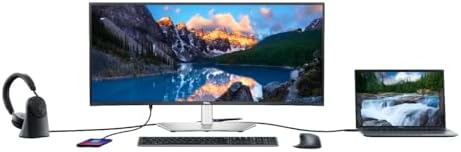
A professional-tier 34" curved ultrawide with a full Thunderbolt 4 hub, 90W PD, and 2.5GbE — the cleanest single-cable dock monitor for MacBook users.
Price may vary. As an affiliate, we earn from qualifying purchases.
What we like
- Thunderbolt 4 hub with 90W power delivery — true single-cable MacBook dock
- IPS Black panel delivers deeper blacks and 2000:1 contrast vs standard IPS
- Built-in 2.5GbE Ethernet and daisy-chain Thunderbolt output
- 120Hz refresh is a noticeable upgrade over the usual 60Hz productivity ultrawides
- Excellent factory calibration and anti-glare coating
Could be better
- At $699 it's roughly 2x the price of the LG 34WN80C
- Built-in speakers are usable but unremarkable
- No HDR worth mentioning — this is a productivity panel, not a media one
Full Review
The Dell UltraSharp U3425WE sits at the top of the productivity ultrawide market. It’s not trying to be a gaming monitor or a creative reference display — it’s trying to be the last cable you ever plug into your laptop. At that job, it’s the best 34” ultrawide you can buy.
The Thunderbolt Hub Is the Whole Point
Most ultrawides give you USB-C with some power delivery and call it a dock. The U3425WE ships with a full Thunderbolt 4 hub: 90W PD upstream, a Thunderbolt 4 downstream port for daisy-chaining a second display, 2.5GbE Ethernet, and six additional USB ports split between USB-A and USB-C.
For MacBook users, this is transformative. One Thunderbolt cable from your laptop carries video, 90W of charging, wired gigabit-plus networking, your keyboard, mouse, webcam, and external drives. No CalDigit TS4 needed. No dongle graveyard. Close the lid and the monitor is your dock.
The Panel Holds Up Its End
The IPS Black panel delivers a genuine 2000:1 contrast ratio — double what you get from standard IPS displays like the LG 34WN80C. Blacks look black instead of dark gray, which matters more than you’d think for dark-mode coding and long document work.
120Hz isn’t a gaming spec here — it’s what makes macOS feel right. Window animations, scrolling, and cursor tracking all gain the smoothness that 60Hz productivity monitors can’t match. Factory calibration is tight out of the box at around 99% sRGB.
Is the Premium Worth It Over the LG 34WN80C?
The LG 34WN80C is roughly $350 and covers the basics: 3440x1440, USB-C, 60Hz, decent IPS panel. If you plug in a desktop and never move, the LG is enough.
The U3425WE is for the laptop-docked workflow. The full Thunderbolt hub, 2.5GbE, 90W PD, and 120Hz refresh together justify the $300+ premium — but only if you’ll actually use them. If your laptop lives on the desk permanently and you don’t need Ethernet or extra USB ports, save the money. For a broader look at the category, see our best ultrawide monitors guide.
Build and Ergonomics
The stand offers tilt, swivel, and height adjustment with a smooth, solid feel — this is the Dell UltraSharp ergonomic stand at its usual high standard. The bezels are thin on three sides. Cable routing is clean and the Thunderbolt ports are accessible without having to blindly fish behind the panel.
Who Should Buy This
Buy the Dell U3425WE if you work primarily from a MacBook or Thunderbolt-equipped PC laptop and want a single-cable desk. The Thunderbolt hub, 90W charging, and 2.5GbE replace a separate dock entirely, and the 120Hz IPS Black panel is genuinely excellent. Skip it if you have a desktop tower, don’t need the hub features, or just want a capable ultrawide for under $400 — in that case the LG 34WN80C does 80% of the job for half the money.


