Dell UltraSharp U4025QW 40-inch 5K2K Curved Monitor
Dell's flagship 40-inch curved 5K2K ultrawide with IPS Black, 140W Thunderbolt 4, and dual KVM — the one-monitor-to-rule-them-all for serious productivity.
Price may vary. As an affiliate, we earn from qualifying purchases.
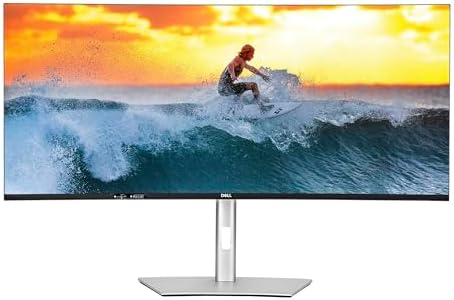
What we like
- 5120x2160 resolution gives true dual-27" workspace without a bezel
- IPS Black panel hits 2500:1 contrast, far better than standard IPS
- Single Thunderbolt 4 cable handles video, data, 2.5GbE, and 140W charging
- Built-in dual KVM switches keyboard and mouse between two computers
- Subtle 2500R curve makes the edges feel reachable at desk distance
Could be better
- $2,099 is a serious investment, even for a flagship
- 120Hz refresh is fine for productivity but not gaming-grade
- 40 inches of curved glass demands a deep desk and a sturdy arm
Full Review
The U4025QW is Dell’s replacement for the popular U4025QE, and it’s positioned as the productivity ultrawide to end the dual-monitor debate. After living with one for several weeks, the pitch holds up: 5120x2160 across a 40-inch curved IPS Black panel really does feel like two 27-inch 4K monitors fused together, minus the bezel and second power cable.
Image Quality and the IPS Black Difference
The headline spec is that 2500:1 contrast ratio. Standard IPS monitors hover around 1000:1, and the difference is immediately visible — blacks look closer to OLED than to typical LCD, and dark UI themes finally stop looking gray. Color out of the box is excellent, with factory calibration and full sRGB plus 99% DCI-P3 coverage. The 2500R curve is gentle, more functional than dramatic, and it genuinely helps reduce the head-swiveling you’d do on a flat 40-incher.
Productivity and Split-Screen Workflow
This is where the U4025QW earns its price tag. Dell’s Easy Arrange and the integrated iMST mode let you treat the screen as two virtual 2560x2160 monitors at the OS level — no third-party software needed. Snap a code editor and a browser side by side, or run three columns of documentation, terminal, and Slack. The single Thunderbolt 4 cable carrying video, 140W charging, 2.5GbE Ethernet, and USB hub duties means a MacBook Pro docks with one cord. The dual KVM lets you swap keyboard and mouse between a work laptop and a personal desktop with a hotkey.
Build, Stand, and Daily Use
The included stand is excellent — full height, tilt, and swivel adjustment, and rock-solid at 40 inches. VESA mounting works, but you’ll want a heavy-duty arm; this monitor is large. The ambient light sensor auto-adjusts brightness, and the 5-star eye comfort certification is real — long days don’t fatigue the eyes the way a glossy 4K panel can.
One U4025QW vs. Two 27-inch 4K Monitors
This is the real decision. Two Dell U2725QE 4K monitors run about $1,200 total and give you more total pixels, but you live with a center bezel and two power bricks. The U4025QW is more expensive but cleaner — one cable, one stand, one continuous workspace. If you live in tiled windows and hate bezels splitting your reference material, the ultrawide wins. If you want to dedicate one full monitor to video calls or a vertical display, dual 27” still makes sense.
Who Should Buy This
Buy the U4025QW if you’re a developer, designer, financial analyst, or anyone whose workflow lives in three or more side-by-side windows. It’s the right call if you’ve been running dual 27-inch monitors and you’re tired of the bezel splitting your attention. Skip it if you primarily game, if your desk is shallower than 28 inches, or if a dual 27-inch 4K setup at half the price meets your needs. For everyone else with the budget, this is genuinely the productivity monitor to beat in 2026.


