Elevation Lab The Anchor Pro Under-Desk Headphone Mount
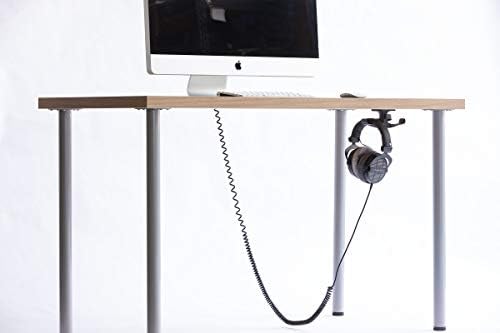
The category-defining under-desk headphone mount, now with a built-in cord channel that keeps your cable out of your knees.
Price may vary. As an affiliate, we earn from qualifying purchases.
What we like
- Glass-reinforced composite holds even heavy audiophile cans and AirPods Max without sagging
- Built-in StowStrap routes and tensions your cable under the desk
- Industrial 3M VHB adhesive bonds in seconds and genuinely doesn't let go
- Frees up desk space and protects your headband from being crushed
Could be better
- Adhesive mount is effectively permanent — removing it can pull desk finish
- Won't work on textured, mesh, or heavily uneven under-desk surfaces
- Costs roughly double the original Anchor for the added cord channel
Full Review
The Anchor Pro solved a problem most people don’t realize they have until they fix it: headphones that live on the desk, eating space and getting knocked around. It sticks to the underside of your desk and holds your cans out of the way, with a cord channel that keeps the cable from dangling into your lap. At $24.95, it’s been the default answer in this category for years — and the price has barely moved.
Build Quality
The body is glass-reinforced composite, which Elevation Lab claims is about twice the strength of cast aluminum. In practice that means it doesn’t flex or creak under a heavy pair of headphones. I’ve hung full-size planar cans and AirPods Max off mine with zero sag.
The 3M VHB adhesive is the real story. It bonds in seconds and holds with frightening commitment. That’s a pro and a con — once it’s on, treat it as permanent. Pulling it off later can lift veneer or paint.
The Cord Channel
This is what separates the Pro from the original Anchor. A small velcro StowStrap lets you route your headphone cable up and under the desk, pulled taut and out of your knees. If you run a wired headset to a desktop DAC or amp, this is genuinely useful and the reason to spend the extra money.
If you’re fully wireless and don’t care about cable routing, the standard Anchor does the holding job for less. Buy the Pro only if the cord management earns its keep for you.
Installation and Daily Use
Setup is two minutes: clean the surface, peel, press, wait. After that you stop thinking about it. The hook geometry cradles the headband rather than stretching it, so it doesn’t deform the padding over time. There’s also a secondary hook for keys or a lanyard.
Who Should Buy This
Anyone with a quality pair of headphones and limited desk space. If you run wired cans to a desktop setup, the Pro’s cord channel makes it the clear pick. If you’re wireless-only and just want a place to hang your headset, save a few dollars and get the original Anchor instead.