Elgato Stream Deck Plus
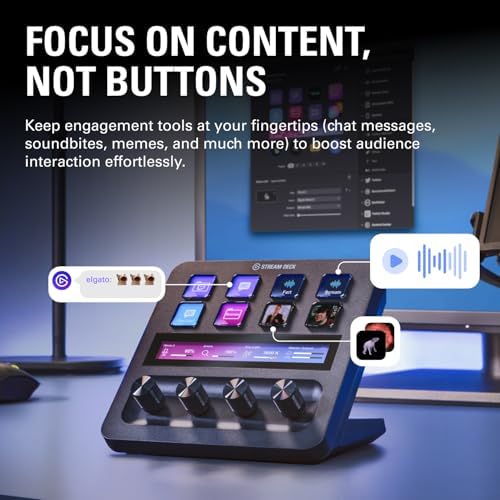
Eight customizable LCD keys, four dials, and a touch strip — the Stream Deck for people who never stream.
Price may vary. As an affiliate, we earn from qualifying purchases.
What we like
- Four physical dials are genuinely useful for volume, brightness, and zoom controls
- Touch strip adds context-aware controls without cluttering the keys
- Stream Deck software is mature with deep app integrations (Zoom, Teams, OBS, Adobe)
- Magnetic faceplate and detachable USB-C cable make desk routing clean
Could be better
- $200 is a hard sell over the $150 MK.2 unless you actually want the dials
- Software setup has a learning curve — getting profiles right takes a weekend
- Stand angle is fixed and a little too upright for some desks
Full Review
The Stream Deck Plus is what happens when Elgato realizes its streaming peripheral has quietly become a remote work tool. Half the people I know with one have never opened OBS in their lives — they use it to mute Zoom, switch Slack statuses, and trigger meeting links. The Plus model adds four dials and a touch strip to the standard eight-key layout, and those analog controls are what justify the upgrade over the cheaper MK.2.
The Dials Are the Whole Point
Eight LCD keys is plenty for app shortcuts and macros, but rotary dials handle continuous values in a way buttons never will. I have mine mapped to system volume, microphone gain, display brightness, and a per-app volume mixer. The dials press in to switch contexts — push the volume dial and it cycles between output device, app mixer, and mute. The touch strip above shows live labels and meter readouts, which sounds gimmicky until you’ve adjusted mic gain mid-meeting without leaving your video call.
Software That Earns the Price
Stream Deck’s software is the real moat. There are dedicated plugins for Zoom mute/camera, Teams, Slack status, Spotify, Hue lights, Home Assistant, and basically every Adobe app. Profiles can auto-switch when you focus a specific application, so your keys become Zoom controls during meetings and Premiere shortcuts when you open Premiere. Setting it up well takes a few hours — but once it’s dialed in, you stop reaching for the trackpad for a dozen daily tasks.
Versus the Stream Deck MK.2
The MK.2 is $150 and gives you 15 keys instead of 8. If your workflow is purely shortcut-based — launch this app, run that macro — the MK.2 is the better buy and you get more keys for less money. The Plus only makes sense if you actually want the dials and touch strip. For audio professionals, video editors, and anyone in back-to-back meetings, that’s a yes. For someone who just wants programmable buttons, save the $50.
Who Should Buy This
Buy the Stream Deck Plus if you’re in meetings constantly and want physical mute and volume controls, or if you edit audio or video and want scrub wheels and parameter dials at your fingertips. Skip it and get the MK.2 if you mostly want shortcut keys, or skip Stream Deck entirely if you’re not willing to spend a weekend building out profiles — an unconfigured Stream Deck is a $200 paperweight.


