espresso Display 15 Touch Portable Monitor
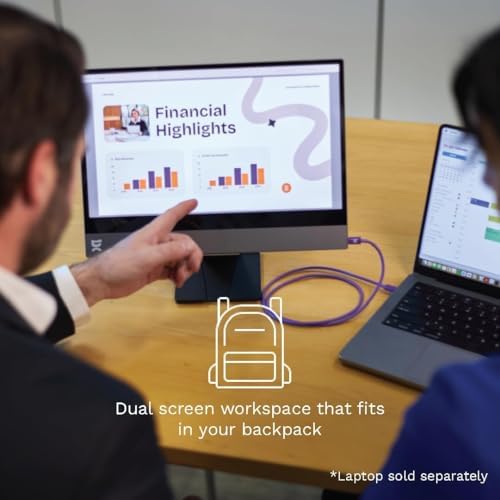
The world's thinnest portable monitor at 5.3mm — a beautifully built 15.6" 1080p touchscreen that Mac users will love, if they can stomach the price.
Price may vary. As an affiliate, we earn from qualifying purchases.
What we like
- Astonishingly thin 5.3mm aluminum chassis — genuinely the nicest-feeling portable monitor you can buy
- Touch works in macOS via espressoFlow, which almost nothing else offers
- Single USB-C cable for video and power
- Magnetic ergonomic stand gives real adjustability, not a flimsy origami flap
Could be better
- 1080p resolution is hard to defend at $539 in 2026
- You're paying a heavy premium for industrial design and touch
- Glossy touchscreen glass picks up glare and fingerprints
- Needs the optional stand for a good experience, adding cost
Full Review
The espresso Display 15 Touch is the portable monitor for people who care how things feel. At 5.3mm, it’s thinner than most phones and lighter than you expect, with a CNC aluminum body and hardened glass front that make every cheaper panel feel like a toy. This is the rare portable display that looks like it belongs next to a MacBook Pro instead of apologizing for itself.
Build and Design
Nothing else in this category comes close on hardware. The chassis is a single slab of aluminum with clean edges and zero flex, and the magnetic ergonomic stand is the real story — it snaps on, holds firmly, and lets you tilt and raise the panel to a genuinely comfortable height. Most portable monitors ship with a folding fabric cover that props the screen at one bad angle. espresso treats the stand as a proper accessory, and it shows.
The Touch Trick
Touch is the feature you’re actually paying for. Plenty of portable monitors advertise touch, but it only works in Windows. espresso’s espressoFlow software brings touch input to macOS, so you can tap, scroll, and mark up directly on the screen next to your Mac. If you sketch, annotate PDFs, or just want a tablet-like second surface for your laptop, this is close to unique. Pair it with the optional stylus and it becomes a credible drawing surface.
The 1080p Problem
Here’s the honest part: this is a 1080p panel in 2026, and it costs $539. On a 15.6” screen, 1080p is fine for browsing, email, and reference windows, but text isn’t razor-sharp and you’ll notice the pixels next to a Retina display. The espresso Pro 15 exists at 4K for serious screen work. You are not buying this monitor for resolution — you’re buying it for the thinness, the metal, and the macOS touch support. Go in clear-eyed about that.
Who Should Buy This
Buy this if you’re a Mac user who wants touch on a second screen and values industrial design enough to pay for it — designers, note-takers, and anyone who’ll actually use the stylus. If you just need more pixels for travel work, skip it: a 4K portable monitor like the espresso Pro 15 or a cheaper non-touch 1080p panel gives you far more screen for the money. Don’t pay this premium for touch you won’t use.