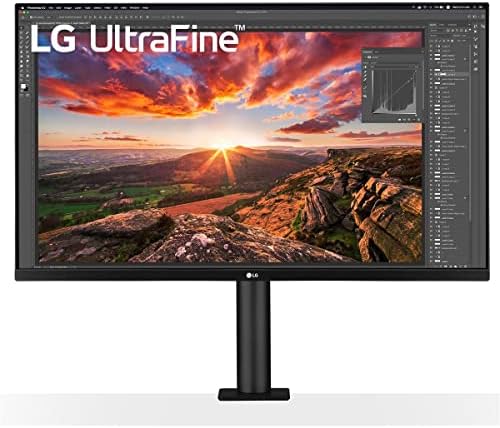
LG 32UN880-B 32" 4K UHD Ergo Monitor
A 32-inch 4K monitor with a built-in ergonomic arm — full articulation without buying a separate mount.
Price may vary. As an affiliate, we earn from qualifying purchases.
What we like
- Built-in Ergo arm replaces a $150+ third-party monitor mount
- Sharp 4K IPS panel with 95% DCI-P3 color coverage
- USB-C with 60W power delivery charges most laptops over one cable
- C-clamp install keeps the desk surface clear
Could be better
- 350 nits brightness is only adequate, not bright
- Built-in speakers are fine for calls but nothing more
- Arm holds this panel only — no swapping monitors later
Full Review
The 32UN880-B solves a problem most 32-inch monitor buyers don’t realize they have until the box arrives: the stock stand is huge, the panel is heavy, and you’ll end up wanting an aftermarket arm anyway. LG built the arm in.
The Ergo Arm Is the Whole Point
The integrated arm clamps to the back edge of your desk and gives you full articulation — height, tilt, swivel, pivot, and about 7 inches of reach. It’s the same range of motion you’d get from an Ergotron LX or a HumanCentric arm, except you don’t pay for it separately and you don’t fight a heavy VESA install alone.
The C-clamp takes five minutes. No grommet hole, no through-desk hardware. The arm pulls the base off your desk entirely, which is the real win on a 32-inch panel — you reclaim roughly a foot of depth compared to the stock pedestal stands most 4K monitors ship with.
The Panel Itself
The IPS panel is sharp and color-accurate at 95% DCI-P3, which puts it in the right ballpark for photo and video work without crossing into dedicated color-grading territory. 4K at 32 inches gives you room for two full documents side-by-side at 100% scaling, or a comfortable 125% on macOS.
350 nits is the soft spot. It’s fine in a normally-lit office but fights back in a room with direct sun. HDR10 is supported but don’t expect real HDR impact at this brightness — treat it as a nice-to-have, not a feature.
USB-C and Daily Use
The USB-C port delivers 60W, which charges most 13–14 inch laptops and many 15-inch ones. One cable handles video, data, and power, which is the single-cable desk setup that makes USB-C worth paying for. The two downstream USB 3.0 ports turn the monitor into a small dock.
Built-in 5W speakers exist. They’re adequate for video calls and terrible for anything else. Plan to use headphones or desk speakers.
Who Should Buy This
Buy the 32UN880-B if you want a 32-inch 4K monitor and you’d otherwise be shopping for a separate arm — the bundled arm pays for itself and saves the install headache. If you already own an Ergotron or similar, skip this and buy a cheaper 32-inch 4K panel like the LG 32UN650-W. And if you need brighter output for a sunlit room or serious HDR work, look at the LG 32EP950 or a 32-inch OLED instead.


