LG DualUp 28MQ780-B Monitor
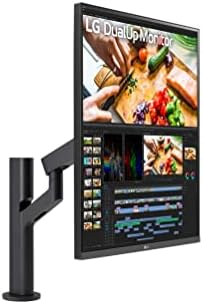
A 16:18 stacked monitor that replaces a horizontal dual-screen setup with one tall panel — ideal for code, documents, and vertical timelines.
Price may vary. As an affiliate, we earn from qualifying purchases.
What we like
- Unique 2560x2880 resolution gives you two full 16:9 panels of vertical space with no bezel gap
- Included Ergo arm clamps to the desk and frees up the entire footprint underneath
- USB-C with 96W power delivery charges most laptops over a single cable
- Nano IPS panel covers 98% DCI-P3 with accurate color out of the box
Could be better
- 60Hz refresh rate makes it a poor fit for gaming or fast motion
- 27.6-inch diagonal at this resolution means UI scaling is mandatory on macOS and Windows
- The tall form factor can feel awkward if your desk sits against a low shelf or window
Full Review
The LG DualUp is the answer to a question most people have never asked: what if instead of two monitors stacked side by side, you had one monitor with the screen real estate of two, stacked vertically? At 2560x2880 in a 16:18 ratio, this is effectively two 16:9 panels glued together with no bezel gap down the middle. For the right person, it’s a revelation. For everyone else, it’s a confusing oddity.
The Vertical Real Estate Is Genuinely Useful
If your work is vertical — long code files, legal documents, design comps, video timelines stacked over preview windows, Slack next to a browser — the DualUp lets you see roughly twice as much without turning your head. You can run two full-size app windows stacked, or split a single window into a top half and bottom half that each feel like a normal monitor. After a week, going back to a single 27-inch widescreen feels cramped in a way that’s hard to articulate.
Build Quality and the Ergo Arm
The included Ergo arm is the unsung hero here. It clamps to the back of the desk, swings out, tilts, and pivots, and it carries the weight of the panel without sag. Buying a comparable arm separately would run $150 or more, so factor that into the price. The panel itself is a Nano IPS with a matte finish, 300 nits, and a 60Hz refresh rate that’s fine for productivity but useless for gaming.
Connectivity and Daily Use
USB-C with 96W power delivery is the killer feature for laptop users — one cable carries video, data, and charge. Color is excellent for an office monitor: 98% DCI-P3, accurate enough for photo editing if not pro color grading. The on-screen menu is the usual LG joystick affair, which works fine.
Who Should Buy This
Buy the DualUp if you write code, edit documents, or work with vertically-oriented content all day and have always found horizontal dual-monitor setups awkward. It’s also a smart pick if your desk is shallow and you can’t fit two side-by-side panels. If you want a gaming monitor, a color-critical reference display, or a single ultrawide for video editing, look elsewhere — the DualUp is purpose-built for one specific workflow, and it does that job better than anything else.


