LG gram+view 16" Portable Monitor
A 2.2-pound 16-inch 2560x1600 portable monitor with single-cable USB-C and auto-rotate — the best travel-friendly second screen for laptop workers.
Price may vary. As an affiliate, we earn from qualifying purchases.
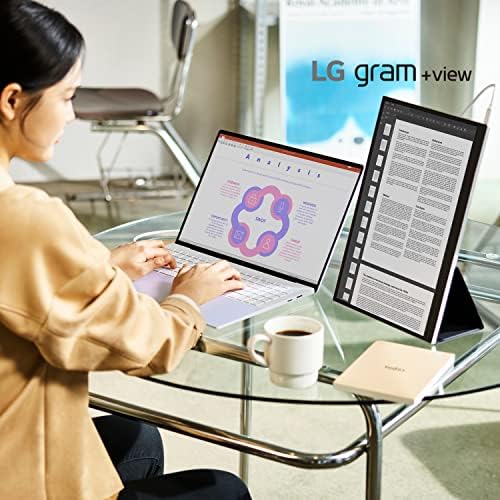
What we like
- Sharp 2560x1600 IPS panel in a 16:10 aspect ratio
- Just 2.2 lbs and slim enough to slide next to a laptop in a sleeve
- Single USB-C cable handles power and video
- Auto-rotate for portrait use without fiddling with display settings
- Folio cover doubles as the stand
Could be better
- 60Hz only — not a gaming display
- Brightness tops out around 350 nits, which is fine indoors but dim in bright rooms
- Premium price versus the ASUS ZenScreen and other 1080p portables
Full Review
LG built the gram+view as a companion screen for its gram laptop line, but it works with any USB-C host that supports DisplayPort Alt Mode — MacBooks, XPS laptops, Framework, ThinkPads, iPads, even the Steam Deck. It is the portable monitor I recommend most often to laptop-first workers because it matches the resolution and build quality of a good built-in laptop display instead of feeling like a compromise.
Image Quality
The 2560x1600 IPS panel is the headline feature. You get the same pixel density as a 16-inch MacBook Pro, and the 16:10 ratio gives you meaningfully more vertical space than a 16:9 portable — more code lines, more email, more spreadsheet rows. Color coverage is 99% DCI-P3, which is overkill for spreadsheets and Slack but genuinely useful if you edit photos on the road. Brightness is the one place it stretches: 350 nits is fine in an office or a hotel room, but it struggles near a bright window.
Build and Portability
At 2.2 lbs the gram+view is not the lightest portable monitor on the market, but it is the lightest one at this resolution. The aluminum chassis feels like a real LG product rather than a cheap accessory, and the bundled folio cover snaps on magnetically and folds into a stand that supports both landscape and portrait. The auto-rotate sensor actually works — flip the panel vertical and the image rotates within a second, no display settings dance required.
Connectivity and Daily Use
USB-C ports on both sides mean you can route cables around whatever side your laptop port is on, which matters more than you’d think when you’re squeezed into a coffee shop booth. One cable carries power and video. The monitor draws power from the laptop, so for long unplugged sessions you’ll want to pass power through from a charger into the free USB-C port on the monitor — it works, but it is not a full dock, so don’t expect extra USB passthrough.
Who Should Buy This
Buy the gram+view if you’re a laptop worker who wants a second screen that matches your laptop’s resolution and travels without complaint. If you want the cheapest usable portable monitor and 1080p is enough, the ASUS ZenScreen MB16AC is half the price and still does the job. If you only use a second screen at a fixed desk, a regular 24-inch monitor gives you more pixels per dollar. But for anyone who alternates between a home office and working from the road, this is the portable I’d buy.


