Logitech Brio 500 1080p HDR Webcam
The mainstream office webcam pick — 1080p with auto light correction, dual noise-reduction mics, and a clever magnetic mount that beats any built-in laptop camera.
Price may vary. As an affiliate, we earn from qualifying purchases.
What we like
- RightLight 4 auto exposure handles bad lighting better than any built-in laptop cam
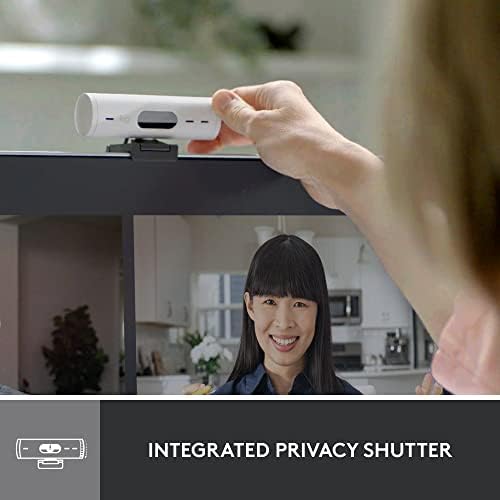
- Magnetic monitor mount tilts and detaches in a second for Show Mode
- Dual beamforming mics sound good enough to skip a dedicated podcast mic for meetings
- USB-C cable is detachable and replaceable
Could be better
- 1080p only — no 4K if you want to crop in for content creation
- Logi Tune software is required to unlock auto-framing and the best image tuning
- Fixed-focus lens can hunt in very low light
Full Review
If you’re still using the webcam built into your laptop lid, the Brio 500 is the cheapest upgrade that will make your coworkers stop asking if your camera is broken. It’s not the most exciting webcam Logitech makes, but it’s the one most office workers should actually buy.
Image Quality
The Brio 500 caps at 1080p/30, which is the right call at this price. Logitech’s RightLight 4 HDR processing does the heavy lifting — backlit windows, cheap overhead office lighting, late-evening lamp glow all get smoothed out automatically. Skin tones look natural instead of the magenta-tinted mess most built-in cameras produce.
If you sit in a properly lit room, a $300 4K webcam will look sharper. In normal home-office conditions, the Brio 500 closes most of that gap by exposing the scene correctly in the first place.
Hardware and Mounting
The magnetic mount is the underrated feature. The clip stays on your monitor, and the camera snaps on and off with one hand. Pull it down, point it at your desk, and you’re in Show Mode — useful for hardware demos, sketching, or holding up a product on a call. A tripod thread on the bottom covers the rare case where you want to mount it lower.
The cable is USB-C on both ends, detachable, and easy to route. The privacy shutter is a physical slider, not a software toggle.
Audio and Software
The dual beamforming mics are surprisingly good — clear enough that you can skip a dedicated USB mic if your meetings are the only thing you care about. They’re not going to replace a Shure MV7 for podcasting, but they’ll outperform AirPods on a Zoom call.
Logi Tune is technically optional but practically required. Auto-framing, field-of-view adjustment, and image presets all live in the app. Install it once, set it, forget it.
Who Should Buy This
Buy the Brio 500 if you take video meetings most days and want a meaningful upgrade over a laptop lid camera without spending $200+. It’s the right pick for hybrid workers, managers on Zoom all day, and anyone whose teammates have politely suggested the lighting could be better.
Skip it if you stream or record content — get the MX Brio 4K instead. Skip it if you work in a sun-drenched room and your built-in camera already looks fine; the gains will be smaller than the price tag suggests.