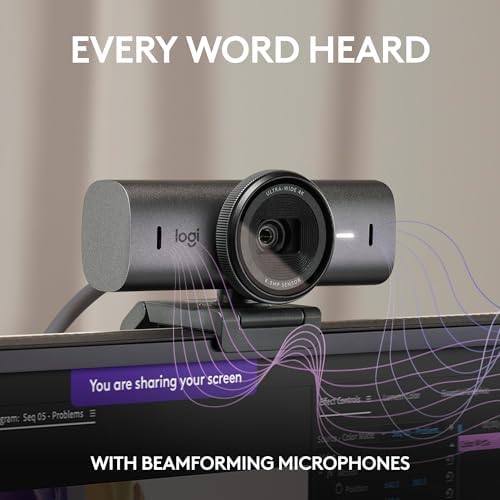
Logitech MX Brio 4K Webcam
Logitech's 2024 flagship webcam pairs a genuinely good 4K sensor with Show Mode and smart framing — the first Brio worth the upgrade in years.
Price may vary. As an affiliate, we earn from qualifying purchases.
What we like
- 4K/30fps sensor with 70% larger pixels noticeably cleans up low-light video
- Show Mode tilts the camera down to share notes, sketches, or desk objects
- AI Auto Framing tracks you without the jittery recentering cheaper cams do
- USB-C with a sturdy aluminum mount that actually grips modern slim monitors
Could be better
- $200 is hard to justify over the still-excellent Brio 500 at half the price
- Logi Options+ and G Hub compete for control — the software story is a mess
- Mics are fine for calls but nothing close to a dedicated USB microphone
Full Review
The MX Brio is the first webcam upgrade in years where you can actually see the difference on a call. The new sensor has 70% larger pixels than the outgoing Brio 4K Pro, and in a typical home office — one window, one overhead light, no ring light — you get cleaner skin tones, less noise in shadows, and a sharper overall image. It finally looks like a $200 webcam should.
Build and Mounting
The housing is a clean aluminum cylinder that feels more like a Sony compact than a Logitech accessory. The clip has rubberized pads and a deeper bite than the old Brio, so it stays put on thin monitors like the Studio Display or LG UltraFines. There’s a 1/4-20 thread underneath for a tripod or monitor arm mount. The privacy shutter is a proper mechanical cover, not a sticker, and it clicks shut with a satisfying detent.
Show Mode and Framing
Show Mode is the feature that’ll sell this to a certain crowd. Tilt the camera down 90 degrees and it automatically flips and corrects the image to show your desk surface — great for sketching, handwritten notes, or showing a physical prototype on a call. AI Auto Framing works better than I expected. It follows you slowly and smoothly without the jumpy “reacquiring target” behavior I’ve seen on Insta360 and Opal cams.
Image Quality in Practice
At 4K/30 the detail is genuinely noticeable on a 1440p or 4K monitor at the other end of the call. For Zoom and Teams, most meetings compress to 720p anyway, so the real win is the low-light improvement and the wider dynamic range — backlit windows don’t blow out like they used to. 1080p/60fps is available for streamers who want smoother motion.
Software and Mics
Logi Options+ handles framing, field-of-view presets, and exposure, but Logitech also ships G Hub, Logi Tune, and Capture for various overlapping reasons. Pick one and ignore the rest. The dual omnidirectional mics are acceptable for calls but I’d still pair this with a proper mic if you record content.
Who Should Buy This
Buy the MX Brio if you’re on video calls all day, care about looking like a professional on them, and have outgrown a $100 webcam. If you mostly do internal Zooms at 720p, the Logitech Brio 500 is still the smarter buy at half the price. For streamers who need 4K/60 or better autofocus, a Sony ZV-1 or used mirrorless over HDMI is a better path than any webcam.