OBSBOT Tiny 3 Lite 4K AI Webcam
The Tiny 3's AI tracking and tri-mic spatial audio at $100 less — the webcam to beat under $250 for remote workers.
Price may vary. As an affiliate, we earn from qualifying purchases.
What we like
- Same PTZ AI tracking as the flagship Tiny 3
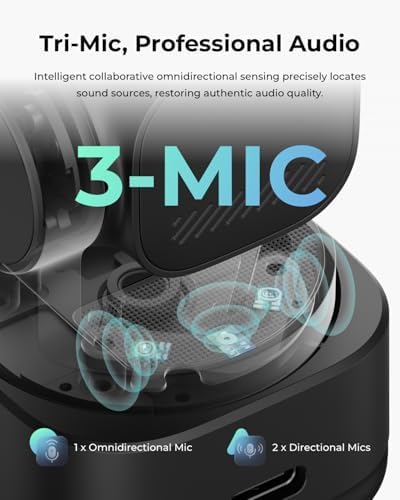
- Tri-mic array sounds noticeably better than any built-in laptop mic on Zoom
- True 4K at 30fps with 1080p/120fps slow-motion option
- Voice and gesture control actually work — no remote needed
Could be better
- Smaller 1/2" sensor struggles more than the Tiny 3 in dim rooms
- Magnetic mount is convenient but feels less secure on thick monitor bezels
- OBSBOT software is required to unlock most AI features
Full Review
OBSBOT’s strategy with the Tiny 3 Lite is obvious: take the flagship Tiny 3, swap the 1/1.28” sensor for a 1/2” one, drop the price by $100, and let the AI tracking do the heavy lifting. After a few weeks on daily standups, it works. This is the webcam most remote workers should be buying.
Tracking and PTZ
The two-axis gimbal physically pans and tilts to keep you centered. That sounds gimmicky until you compare it to a static webcam doing digital crop-tracking — the Tiny 3 Lite stays sharp because it’s actually pointing at you, not zooming into a corner of a wide-angle frame. Stand up at your desk, walk to the whiteboard, lean over to grab a coffee — it follows smoothly without the jerky digital snap you get on the Insta360 Link 2.
Audio Is the Real Story
The tri-mic array is the reason to pick this over competitors. One omnidirectional mic plus two directional MEMS mics let it beamform toward your voice while rejecting keyboard clatter and HVAC hum. On Zoom and Teams, callers consistently said I sounded better than they did. If you’ve been getting by with AirPods on every call, this replaces them.
Where the Lite Compromises
The 1/2” sensor is where you feel the $100 savings. In good window light it’s indistinguishable from the Tiny 3. After sunset with just a desk lamp, the Tiny 3 holds detail better and shows less noise. HDR helps in mixed lighting, but if your office is genuinely dim, spend up for the flagship — or fix your lighting first.
Who Should Buy This
Remote workers and hybrid employees who live in Zoom and Teams calls and want a webcam that handles itself. If you want PTZ tracking and great call audio without paying flagship price, the Tiny 3 Lite is the clear pick. Streamers and content creators in low-light setups should still consider the standard Tiny 3 for the larger sensor. Skip it if you only do a couple calls a week — your laptop camera is fine.


