Rain Design mStand Laptop Stand
The original premium aluminum laptop stand — fixed height, flawless build, and a near-universal fit that's earned its place on desks for over 15 years.
Price may vary. As an affiliate, we earn from qualifying purchases.
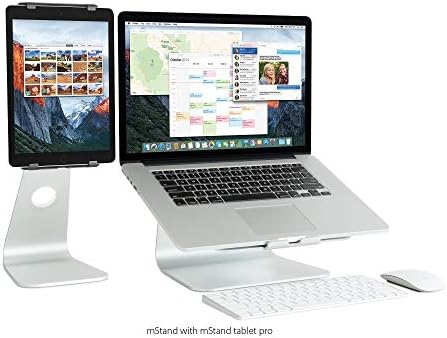
What we like
- Single-piece aluminum construction feels genuinely premium
- Open channel design pulls heat away from the laptop base
- Universal fit works with virtually any laptop up to 17 inches
- Cable routing slot keeps your desk tidy
- Rubber grips hold the laptop and protect your desk surface
Could be better
- Fixed height — no adjustment for different seating setups
- Pricey for what is essentially a bent piece of aluminum
- Portrait-only orientation; no landscape or pivot option
Full Review
The Rain Design mStand has been the default recommendation for laptop stands since 2006. That kind of staying power isn’t marketing — it’s the result of solving a simple problem extremely well and never overcomplicating it.
Build Quality
This is a single bent piece of aluminum alloy with rubber pads and a cable slot. There are no moving parts, no plastic components, no hinges to loosen over time. The anodized finish matches Apple’s aluminum aesthetic closely enough that it looks like it shipped alongside a MacBook. It’s heavier than you’d expect for its size, which translates directly into stability — the stand doesn’t shift or rock.
Thermal Performance
The raised platform and open underside allow air to circulate freely beneath your laptop. The aluminum base also acts as a passive heat sink, pulling warmth away from the chassis contact points. This is especially noticeable with older MacBooks or any machine that runs warm under sustained load. It won’t replace active cooling, but it’s meaningfully better than a laptop sitting flat on a desk.
Ergonomics and Daily Use
The 5.9-inch lift brings a 13–15 inch laptop screen to roughly eye level for most seated setups. Typing directly on the elevated keyboard is awkward — you’ll want an external keyboard and mouse, which is the correct way to use any laptop stand. The cable slot on the back keeps your charging cable and USB-C hub from cluttering the desktop. It’s a small detail that adds up over time.
The Fixed-Height Tradeoff
The mStand’s only real limitation is that it doesn’t adjust. If you’re taller, shorter, or switch between sitting and standing, the single height may not hit the right angle for your neck. Adjustable alternatives like the Twelve South Curve or Nexstand K2 solve this, though neither matches the mStand’s build quality at the same price. If you’ve dialed in your desk height and ergonomic setup, the fixed position is a non-issue.
Who Should Buy This
The mStand is the right choice if you have a fixed desk setup, want something that looks intentional rather than functional, and plan to use it for years. It’s ideal for MacBook users who care about the aesthetic match. If you need height adjustment or frequently move between locations, look at the Nexstand K2 instead — it folds flat and covers a range of heights for less money. But if you’re parking a laptop on your desk permanently and want the best fixed stand money can buy, nothing has beaten this in 15 years.


