Samsung ViewFinity S9 27" 5K Monitor
A 5K IPS panel with Thunderbolt 4, 90W charging, and a detachable 4K webcam — the only real alternative to Apple's Studio Display.
Price may vary. As an affiliate, we earn from qualifying purchases.
What we like
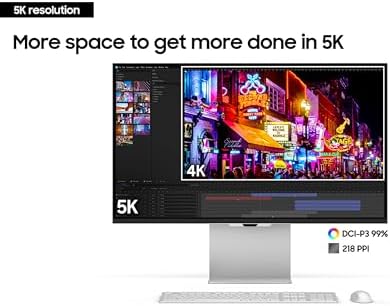
- Retina-matching 218 ppi sharpness at 5120x2880
- Thunderbolt 4 with 90W charging in a single cable
- Matte anti-glare coating handles office lighting
- Factory-calibrated 99% DCI-P3 color accuracy
Could be better
- Tizen smart TV interface feels out of place on a work monitor
- Detachable SlimFit camera is 4K but fidgety to attach
- Only one Thunderbolt upstream port and three USB-C downstream
Full Review
For years, if you wanted 5K on your desk, you bought an Apple Studio Display and lived with its locked-down ecosystem. The ViewFinity S9 changed that. Samsung built a genuine competitor — same 27-inch size, same 5120x2880 resolution, same 218 ppi pixel density — and priced it just below Apple’s offering. If you’ve been waiting for a real alternative, this is it.
Image Quality
The 5K panel is the reason to buy this monitor, and it delivers. Text is crisp enough that you stop noticing pixels, which is the whole point when you’re staring at code or copy all day. Photos and video edits render with the kind of detail you only get from a display that matches your source resolution instead of scaling it.
Color coverage hits 99% DCI-P3 with factory calibration under Delta E 2, so photo and video editors get usable accuracy out of the box. The matte coating is the right call for an office — it kills glare without the sparkle some anti-glare treatments introduce. HDR600 support is listed, but like most monitors at this tier, HDR is more “present” than transformative.
Thunderbolt 4 and Connectivity
Thunderbolt 4 with 90W power delivery is the practical killer feature. One cable carries 5K video, data, and enough power to charge a 14-inch MacBook Pro at full speed. Three downstream USB-C ports turn the display into a dock, which cleans up your desk considerably.
The trade-off: there’s only one Thunderbolt input, and the other video option is Mini DisplayPort. No HDMI. If you want to connect a console or a second laptop, you’ll need adapters or a KVM.
The Smart TV Problem
Samsung ran Tizen on this thing. You get Netflix, AirPlay, a Gaming Hub, and an on-screen remote-style interface that’s pure overkill for a productivity monitor. Most of it can be ignored, but the menu system inherits smart TV quirks — slow wake-ups, occasional prompts about app updates, a settings layout designed for a couch rather than a desk. It’s not a dealbreaker, but it’s the main thing that makes this feel less polished than the Studio Display.
The detachable SlimFit 4K webcam is a nice idea in theory. In practice, it’s finicky to dock, and if you already have a dedicated webcam, you’ll leave it in the box.
Who Should Buy This
Buy the ViewFinity S9 if you want Studio Display sharpness without being locked into Apple’s walled garden, or if you need Thunderbolt 4 charging for a Windows laptop that the Studio Display can’t fully power. Creative professionals editing photo and video benefit most from the pixel density and color coverage.
If you’re on a Mac and don’t need PC compatibility, the Apple Studio Display is more polished and better integrated — the extra $300 buys you a calmer product. And if 5K isn’t essential, a good 4K monitor at half the price will serve most office work just fine.


