Xebec Tri-Screen 3 Portable Laptop Screen Extender
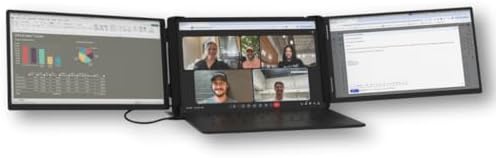
A precision-milled triple-monitor rig that clips onto a 13–18" laptop and runs both 13.3" panels off a single USB-C cable — built for road warriors who need real screen real estate on a tray table.
Price may vary. As an affiliate, we earn from qualifying purchases.
What we like
- Two full 13.3" displays from one USB-C cable — genuinely plug-and-play on Windows
- Tension-fit mount holds firm on 13–18" laptops without magnets or adhesives
- 60W USB-C pass-through keeps the laptop charging while both panels run
- Aluminum chassis and EVA travel case actually survive being thrown in a backpack
Could be better
- $649 is a lot — more than most people pay for their main monitor
- Mac users need the bundled DisplayLink adapter (different SKU) and take a CPU hit
- 3.6 lb of extra weight in your bag is noticeable on long trips
Full Review
The Tri-Screen 3 is Xebec’s third attempt at making a triple-monitor laptop rig that doesn’t fall apart on the road, and it’s the first version that feels like a finished product rather than a clever prototype. Two 13.3-inch panels fold out from either side of your laptop lid, the whole thing connects with one cable, and you end up with roughly the same horizontal screen space as a 32-inch ultrawide — except it fits in a backpack.
Setup Friction Is Almost Zero on Windows
The patented tension-fit mount slides over your laptop screen and grips with reinforced kickstands. No magnets, no adhesive, no permanent attachment. Plug the embedded USB-C cable into a Thunderbolt or USB-C DisplayPort Alt Mode port and Windows extends to both panels in about three seconds. No drivers, no app, no calibration step.
Mac is a different story. The MacBook version (a separate SKU) ships with a DisplayLink adapter because Apple still won’t allow more than one external display over a single USB-C connection on most M-series chips. DisplayLink works, but it eats a noticeable chunk of CPU and you’ll see frame drops on video playback. If you’re on Mac, factor that in honestly before spending $649.
Does It Actually Work on a Plane Tray?
This is the question that matters, and the answer is yes — with caveats. On a standard economy tray table, a 14-inch laptop with both wings extended needs roughly 22 inches of horizontal clearance. That fits on most domestic carriers when the seat in front isn’t reclined. The moment they recline, you’re folding the wings back in. On a bulkhead seat or premium economy with a wider tray, it’s effortless.
Battery drain is real. Running both panels off your laptop’s USB-C without pass-through power will cut your runtime by 40–50%. The 60W pass-through fixes this if you can find an outlet, but plenty of seats still don’t have one. Pack a 100W GaN brick.
Build Quality Justifies Most of the Price
The precision-milled aluminum case feels like a piece of camera gear. Hinges are stiff in the right way, the kickstands deploy without flex, and the EVA travel case has carved-out slots that actually fit the unit. Compared to the Tri-Screen 2’s plastic shell, this is a different class of product. It also weighs 3.6 lb on its own — meaningful when you’re already carrying a laptop and charger.
Tri-Screen vs a Single Larger Portable Monitor
If you mostly need more pixels for one task — a spreadsheet, a code editor, a video timeline — a single 16-inch portable like the ASUS ZenScreen OLED or a 4K travel monitor will give you sharper results for $300–$400 less. The Tri-Screen wins when your work is genuinely parallel: Slack on one wing, doc on the main screen, dashboard on the other. Sales reps, traders, support engineers, and anyone juggling three apps in real time will get more from the triple layout than from a single bigger panel.
Who Should Buy This
Buy the Tri-Screen 3 if you travel weekly, work in a multi-window job, and have already tried a single portable monitor and found it insufficient. The $649 price stings, but the build quality and Windows-side simplicity earn it for genuine road warriors. If you only travel a few times a year, get a single 16-inch portable monitor and pocket the difference. And if you’re on a recent MacBook, wait for Apple to fix multi-display USB-C — or accept the DisplayLink tax going in.


