Keychron Q6 HE QMK Wireless Keyboard
The first full-size wireless QMK keyboard with Hall Effect magnetic switches — premium aluminum build, adjustable actuation, and tri-mode connectivity.
Price may vary. As an affiliate, we earn from qualifying purchases.
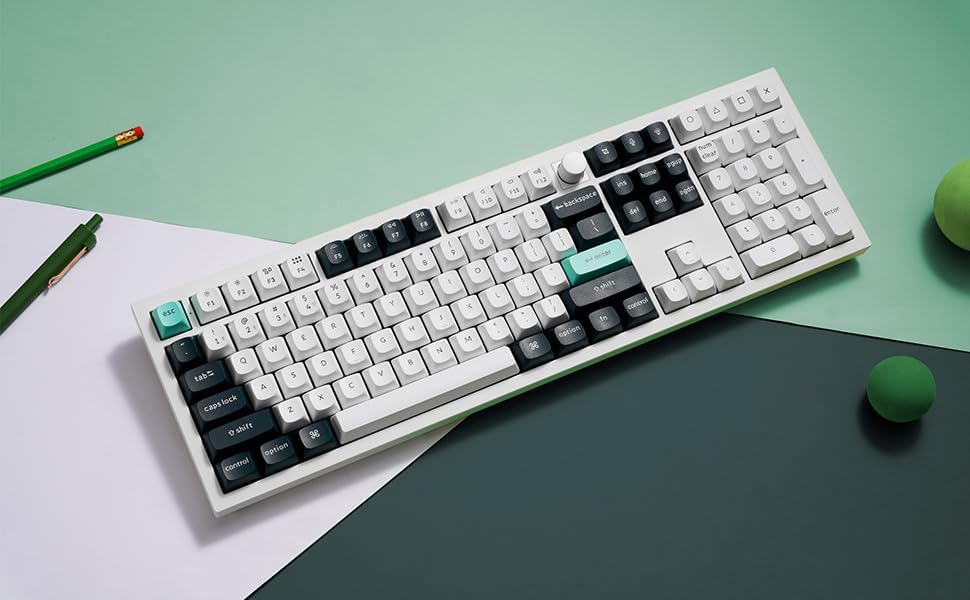
What we like
- Hall Effect switches with 0.1mm adjustable actuation
- Full CNC aluminum body feels genuinely premium
- Tri-mode connectivity (2.4GHz, Bluetooth, USB-C)
- Full-size layout with dedicated number pad
- QMK/VIA programmable via Keychron Launcher
Could be better
- Heavy at over 5 lbs — not portable
- Rapid Trigger benefits are wasted on pure typing workflows
- Magnetic switches limit hot-swap to other HE switches
Full Review
The Q6 HE is Keychron’s answer to a gap nobody else had filled: a full-size, wireless, QMK-programmable keyboard built around Hall Effect magnetic switches. Until this board shipped, you had to pick two of those four. Now you don’t.
Hall Effect for a Home Office
Hall Effect switches read key position magnetically instead of using a physical contact, which means you can set the actuation point anywhere from 0.1mm to 3.8mm. For typing, set it deep (2.0mm or higher) and it feels like a normal linear mechanical switch — slightly smoother than a Gateron Red, with a clean bottom-out on the double-rail design.
The Rapid Trigger feature — where the key resets the instant you start lifting it — is the headline gaming spec. For typing, it’s irrelevant. What actually matters in an office is that you can dial in a deeper actuation than a typical 2.0mm switch, which kills accidental key presses if you rest your fingers heavily.
Build Quality
The full aluminum CNC case is the same chassis Keychron uses on the Q-series, and it’s the best build in this price range. It does not flex, it does not ping, and it weighs over five pounds — this keyboard does not move when you bump it. Double-shot PBT keycaps come standard, the gasket mount gives a soft, even typing feel, and the rotary knob in the top right is genuinely useful for volume and scrubbing.
Tri-Mode Wireless and QMK
2.4GHz with a 1000Hz polling rate is the connection you actually use day-to-day — low latency, no Bluetooth pairing drama. Bluetooth 5.1 handles three additional devices for switching between a work laptop and personal machine. QMK firmware via the Keychron Launcher web app means you can remap every key, build layers, and program the knob without installing software.
Full-Size Trade-off
A 100% layout earns its desk space if you live in spreadsheets, accounting software, or any tool where the dedicated number pad saves real keystrokes. If you don’t use the number pad, the Q5 Max gives you 96% of this experience without the magnetic switches, and the Q1 Ultra drops to 75% if desk space is tight.
Who Should Buy This
Buy the Q6 HE if you want a number pad, type all day, and occasionally game on the same keyboard — the adjustable actuation is the closest thing to a “best of both worlds” switch on the market. Skip it if you never touch a number pad (get the Q1 Ultra instead) or if you only type and don’t game (a standard mechanical Q6 Max saves you about $40 for nearly identical typing feel).


