Desk Accessories · Review
Loupedeck Live S
A dial-forward macro console with 15 haptic touch buttons and two analog dials, built for volume, scrubbing and app control as an alternative to Stream Deck.
Published
Our verdict
4.1 / 5
Price at time of review
$249.99
Prices change. As an affiliate, we earn from qualifying purchases — it never decides the verdict.
What we like
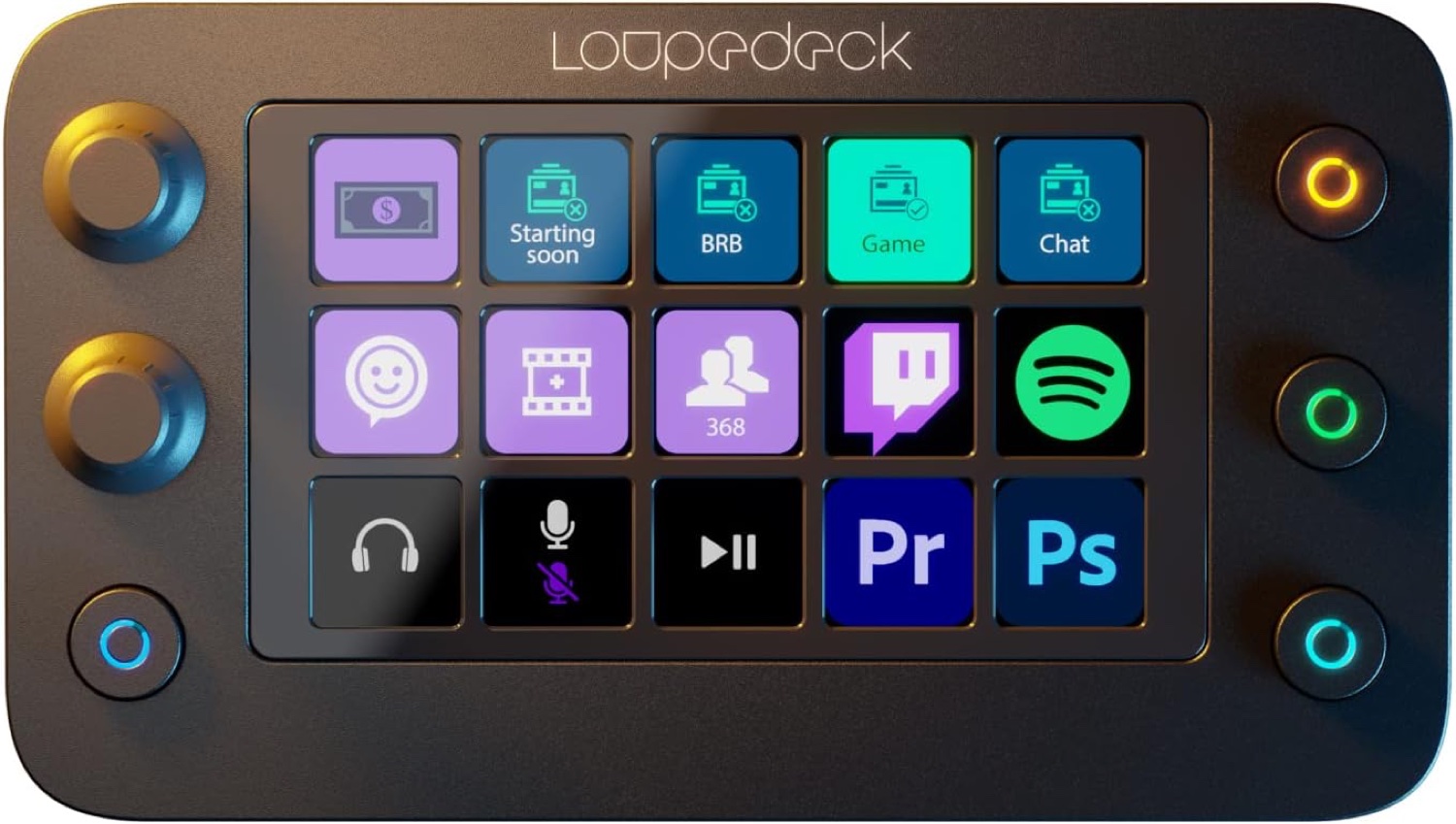
- Two analog dials with push function and notched feedback suit volume, scrubbing and timeline work better than keys
- 15 LED touch-sensitive buttons with haptic feedback
- Native plug-ins and ready-made profiles for OBS Studio, Zoom, Spotify, Adobe apps and Final Cut Pro
- Up to 14 swipeable pages, plus Custom Actions for macros, multi-toggles and rotary adjustments
- Marketplace with 200+ profiles, plug-ins, icon packs and sound packs
Could be better
- $249.99 is a lot for a 15-button pad, and the Stream Deck Neo costs much less
- Needs Loupedeck's software to run, so you depend on its ecosystem
- Only two dials, and the side displays found on the original Loupedeck Live are gone
Full Review
Build and Feel
The Live S is a compact slab with a 5×3 grid of touch buttons, two dials on the left and four physical RGB buttons around the screen. It’s a little bigger than a basic Stream Deck because of the dials. Reviewers describe the buttons and dials as clicky, and the dials have a satisfying incremental notch as you turn them.
The touch buttons give haptic feedback. Glass doesn’t feel like a keycap, but the buzz does confirm each press.
Key Features
The dials are why you’d buy it. Turning a real wheel for volume, brush size, timeline scrubbing or zoom is faster and more precise than tapping a key repeatedly. Pressing a dial can reset or toggle a value, so each one does two jobs.
Software is the other strength. The native plug-ins cover OBS Studio, Twitch, Ecamm, vMix, Spotify, Adobe Premiere Pro, Photoshop and Final Cut Pro, and each ships with ready-made profiles. You can build up to 14 swipeable pages and chain multi-step Custom Actions. The marketplace adds over 200 profiles and plug-ins, including Philips Hue, Nanoleaf and Voicemod.
Daily Use
For meetings and office work, the pairing of dials and buttons works well. Put mute and camera toggles on keys, and put speaker volume or a spreadsheet scroll on a dial. Profiles can switch automatically with the active app, so the layout changes as you move between windows.
The trade-offs are real. Two dials is a short supply if you edit heavily. You also need Loupedeck’s software running, and the original Live’s side displays are gone to make room for the extra key column.
How It Compares
The Stream Deck Neo is far cheaper if you only want simple shortcut keys. If you want dials plus a touch strip, look at the Stream Deck Plus. If your work is mostly Adobe and Office, the MX Creative Console is a close rival to the Live S.
Who Should Buy This
Buy the Live S if you edit, stream or work in creative or office apps and want physical dials for continuous adjustments. It’s also a good pick if you’ve found Stream Deck’s all-key layout limiting.
Skip it if you just need launch-and-toggle shortcuts. The Neo does that for much less. Also skip it if you want more than two dials or prefer an ecosystem built around Elgato’s gear.